macOS · menu barWindows · system tray · beta
Speak. It types
And Space fixes words typed in the wrong keyboard layout.
Press Left ⌥, talk, press it again — Sayful writes clean, polished text at your cursor in any Mac app. Press Ctrl+Space, talk, press it again — Sayful writes clean, polished text at your cursor in any Windows app.
Free — 3,000 words a week · Dictation in 99 languages
The film shows the Mac version; on Windows the same things run on the shortcuts named below.
The case for speaking
Your thoughts move faster than your fingers.
Your best ideas never came at 45 wpm.
You don’t type into an LLM anymore. You talk to it. Typing is the bottleneck — not the thinking.
And this is what the sharpest minds are already doing “…lean back, switch to /voice and just ramble for like 10 minutes.”The main event
Your voice,
in every app.
Press Left ⌥ and start talking — Slack, Notion, your terminal, an email draft, anywhere text goes. Press it again to stop, and the transcript appears at your cursor, cleaned up by AI: no filler, correct casing, real punctuation.
Press Ctrl+Space and start talking — Slack, Notion, a browser, an email draft, anywhere text goes. Press it again to stop, and the transcript appears at your cursor, cleaned up by AI: no filler, correct casing, real punctuation.
You speak around 150 words a minute and type around 45. Sayful gives the difference back. Choose Fast for instant transcription or Quality when accuracy matters most. Prefer to hold a key? Turn on push-to-talk in Settings → Features; it uses Shift.
Watch: typing with the wrong layout on…
And one more thing
Wrong layout?
One space fixes it.
Typed a whole message before noticing the keyboard was in the wrong
language — руддщ instead of
hello? Sayful fixes the word the moment you
hit space, switches your input sourcekeyboard layout, and moves on. No selecting, no
retyping. It runs on your MacPC, with no account and no quota.
It reads the keyboard layouts you have installed in macOSWindows, so the fix at the space bar works in more than 50 languages, not a hard-coded pair. Flipping text you selected afterwards, with a double-tap on ⇧Shift, works between any of your alphabetic keyboard layouts too, though not input methods such as Japanese or Chinesebetween English and Ukrainian or Russian.
More than dictation
Six superpowers,
one menu-bartray icon.
-
Fix the wrong layout, live
Typed
руддщwhen you meanthello? Sayful rewrites it and switches your input sourcekeyboard layout back — as you type, in more than 50 languages. -
Flip & correct selection
Select text and double-tap Shift to flip it between your alphabetic keyboard layoutsbetween English and Ukrainian or Russian layouts, or single-tap Shift to fix typos, casing and small grammar slips with AI.
-
Translate on the spot
Select text and press Shift+Space to translate it into the language of your current keyboard layout — German, Japanese, Ukrainian or any otherPolish, Ukrainian and many more.
-
Grab text from the screen
Press ⇧⌘SAlt+Shift+S, drag a box over anything on screen, and the recognised text lands on your clipboard. Works where selection can't.
-
Read anything aloud
Send any selection to a natural-sounding cloud voice and have Sayful read it right back to you. Great for catching mistakes by ear.
-
Your own AI transforms
Save custom AI instructions — rewrite, tidy up, restructure — and run them on any selection with a hotkey. Ships with a Prompt Engineer that turns rough notes into a clean prompt.
The clips show the Mac version and its keys; on Windows use the shortcuts in each card.
Notes
Plan the work.
Then just say it.
Say what needs doing. Notes turns it into cards with projects, priorities, due dates and checklists — or updates the work already on your board.
“Move everything in Review to Done.” “Make the selected cards urgent.” Change a whole group at once, add or tick off checklist steps, and assign teammates on shared boards. Review what changed and undo the command if you need to.
Ask “What’s overdue across all my boards?” to find the work that needs attention. Questions can look across boards; changes apply to the board you’re working on. Prefer the keyboard? Type the same request.
Type or say what to change — “Move the login bug to Done” — and the board assistant does it.
See the same cards as a Board, Table, List, Calendar, Gallery or Chart. Open any card as a page with blocks, sub-pages and links. Import from Notion or CSV, and export to Obsidian.
Plans, sharing & privacy
- Free includes one board; Pro has unlimited boards.
- Boards are stored on this Mac, encrypted, with the key in your Keychain. They are not synced and Time Machine skips them, so export anything you can’t lose.Boards are stored on this PC, encrypted with Windows data protection under your Windows account. They are not synced, so export anything you can’t lose.
- Share a board with your team by email and work on it together, live: see who is on the board and which card they have open, and @‑mention people anywhere in the text. Free shares a board with one person; Pro with as many as you like. A shared board is kept on Sayful’s server, encrypted at rest but not end to end; your other boards stay on your MacPC.
- The board assistant and page AI count toward the free weekly words; on Pro they have no weekly limit.
Also inside
Small tools
that add up.
-
Typing trainer
Touch-typing lessons and timed tests with your stats, for English, Ukrainian and Russian.
-
Personal dictionary
Teach Sayful the names and terms you say. It also notices the corrections you keep making and offers to learn them.Correct a word in your dictation history and it learns that too.
-
Snippets
Say a short trigger and get the full text: spoken shortcuts that expand at the end of your dictation.
-
Insights
Your words per minute, your streaks and where you dictate, kept on your MacPC.
-
Paste last transcript
Dictated into the wrong place? Re-paste your last transcript from the menu bartray icon’s menu.
-
Invite a friend
They get a free month of Pro when they sign up, and you get a free month once they start using Sayful.
How it works
Three moves.
That's the whole app.
-
01
Press the hotkey
Left Option starts listening from the menu bar. No window, no focus stealing.
Ctrl+Space starts listening from the system tray. No window to open, nothing to click.
-
02
Just speak
Say it however it comes out. Sayful captures speech and hands it to AI to tidy.
-
03
Press again, text appears
Polished text drops in at your cursor, in whatever app you're already in.
Press to start dictating, press again to stop.
Press to start dictating, press again to stop.
Fix the selected text.
Flip selected text or the last word between your alphabetic keyboard layoutsbetween English and Ukrainian or Russian.
Translate the selection into the language of your keyboard layout.
Copy text from a screen region.
Copy text from a screen region.
Read the selection aloud.
Read the selection aloud.
Run one of your saved AI transforms on the selection.
Run one of your saved AI transforms on the selection.
Run the Prompt Engineer transform on the selection.
Run the Prompt Engineer transform on the selection.
Privacy, plainly
Your words
stay yours.
Layout correction is rule-based and runs entirely on your Mac — no account, and your text never leaves the machine. The app downloads a word list once per keyboard language, and nothing else. The AI features run in Sayful’s cloud and only see what you send them: the audio you dictate, the text you select, the screen region you box — and, when you ask the Notes assistant, the titles and the start of the text of your cards.
Layout correction is rule-based and runs entirely on your PC — no account, and your text never leaves the machine. Word lists for English, Ukrainian and Russian come with the app; for any other keyboard language it downloads one once, and nothing else. The AI features run in Sayful’s cloud and only see what you send them: the audio you dictate, the text you select, the screen region you box — and, when you ask the Notes assistant, the titles and the start of the text of your cards.
- Your dictation history and your Notes boards are encrypted on disk with AES‑GCM; the keys live in your macOS Keychain, not in the files.Your dictation history and your Notes boards are encrypted on disk with Windows data protection (DPAPI), tied to your Windows account. Only a board you choose to share goes to Sayful’s server.
- No analytics on what you type or dictate — ever.
- AI provider keys are backend‑only secrets and never ship inside the Mac app; for Sayful Cloud the app keeps only your sign‑in session tokens in the Keychain.app; for Sayful Cloud the app keeps only your sign‑in session, encrypted with Windows data protection.
- Automatic layout flipping stays silent in terminals, password managers and other risky apps.and password fields, and in apps running as administrator.
The maths
What you get back.
9.8
hours a week you stop spending on the keyboard
451
hours a year — speaking runs at about 150 wpm, typing at 45
∞
times you don’t retype a sentence because the layout was wrong — and don’t get annoyed about it
The assumption behind these numbers: you dictate about 70% of what you type — messages, email, docs, notes, AI prompts — and keep typing the rest, because nobody dictates code or spreadsheets. That works out to roughly half the time for the same working day.
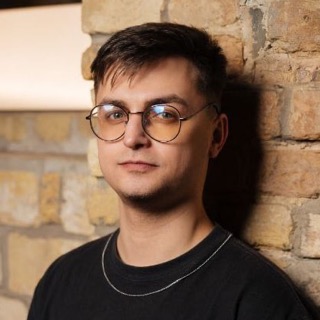
A note before you start
Hi, I’m Mike.
I make Sayful on my own, and I use it every day. It helps me a lot and makes my life simpler.
Time is the most precious thing we have. If Sayful saves you some of it on routine work, for something that matters more, then I haven’t lived my life in vain.
Take care of yourself, your loved ones and your time, and spend it on good things.
Every new account gets a week of Pro from me. And you can give a month to someone close to you; once they start using Sayful, you get another month.
— Mike, who makes Sayful
Pricing
Start free.
Stay free, honestly.
The free plan gives you 3,000 cloud words a week. Layout fixing, the typing trainer and Notes without AI never count against it. A week of Pro is free when you set Sayful up.
Free
$0
- 3,000 words of cloud AI a week
- Dictation in every app
- 1 Notes board
- Layout flip — unlimited, runs locally
- Translate, grammar fix, screen OCR, read aloud
- Typing trainer, snippets and insights
Pro
$12/month
Tax included, billed in USD. Renews monthly until you cancel.
- No limits on cloud AI: dictation, correction, translation, screen text, read aloud
- Unlimited Notes boards
- Share a board with as many people as you like
- Board assistant and page AI included, no weekly limit
- Everything in Free
30-day money-back · cancel anytime · Creem is the merchant of record. How to cancel · Refund policy
Questions
Fair questions,
straight answers.
- Does it work in every app?
- Yes — Sayful types at your cursor through macOS accessibility, so Slack, Notion, terminals, browsers and email all behave the same. If you can place a cursor there, Sayful can type there.
- Yes — Sayful pastes at your cursor, so Slack, Notion, Word, browsers and email all behave the same. It keeps out of password fields, terminals and apps running as administrator: there the text waits on the clipboard for a few seconds, ready for Ctrl+V.
- What happens to my voice recordings?
- Audio goes to Sayful Cloud only while you dictate, is passed to a speech-to-text provider, and is not stored by our servers, which keep usage counts, not content. The recording on your Mac is deleted a few minutes after transcription; one that failed to send is kept until it succeeds, and no longer than 30 days. Local dictation history is encrypted (AES-256) with the key in your macOS Keychain, auto-deleted after 30 days, and nothing you type or dictate is used for training.
- Audio goes to Sayful Cloud only while you dictate, is passed to a speech-to-text provider, and is not stored by our servers, which keep usage counts, not content. The recording on your PC is deleted a few minutes after transcription; one that failed to send is kept for a retry, no longer than 30 days. Local dictation history is encrypted with Windows data protection (DPAPI) under your Windows account, auto-deleted after 30 days, and nothing you type or dictate is used for training.
- What does the layout flip do, exactly?
- When you type a word with the wrong keyboard language active —
руддщinstead ofhello— Sayful notices at the space, rewrites the word and switches your input sourcekeyboard layout. It runs locally with no quota. - Is 3,000 words a week actually enough?
- That's roughly 12 pages of dictated text every week. Layout flip, the typing trainer and Notes without AI don't count against it at all. The Notes board assistant and page AI do, including the board or page text they send along. If you dictate long documents daily, Pro has no weekly limit, and a new account gets a free week of Pro when you finish setting up, so you can see how much you actually use.
- Which languages are supported?
- Dictation detects the language you speak on its own: 99 languages in the default Fast mode, with the best accuracy in widely spoken ones. The automatic layout fix at the space bar reads the keyboard layouts you have installed and covers more than 50 languages. Flipping selected text (double-tap Shift) works between any of your alphabetic keyboard layouts on Mac (not input methods such as Japanese or Chinese)between English and Ukrainian or Russian, Shift+Space translates into the language of your current keyboard layout, and the typing trainer teaches English, Ukrainian and Russian.
- What language is the app in?
- The interface is in English for now, whatever language you dictate in.
- Do I need an account? What works offline?
- Cloud features (dictation, AI fixes, translation, screen OCR, read-aloud and the Notes assistant) need you to sign in with a Google account and to be online. Offline, layout fixing, Notes boards and pages and the typing trainer keep working; anything that calls AI does not.
- Which Macs does it run on?
- Apple Silicon (M1 or newer), macOS 13 or later. Signed and notarized by Apple. There is no Intel build yet.
- Which PCs does it run on?
- Windows 10 or 11, 64-bit (x64). Sayful for Windows is in beta and not code-signed yet, so SmartScreen may say “Windows protected your PC”: choose More info, then Run anyway. It installs for your Windows account in about a minute, with no administrator rights, and keeps itself up to date.
- How do I cancel Pro?
- In Sayful, click your profile icon in the title bar, choose Manage billing and cancel in the billing portal — or use the link in your Creem receipt email. You keep Pro until the end of the period you already paid for. Step by step.
- What will I see on my card statement?
- Creem is the merchant of record and bills for us, so the charge appears as CREEM.IO* followed by a reference, not as Sayful. Prices are in US dollars and already include tax.
- Can I pay from my country?
- Not everywhere. Creem does not accept payments from some countries and regions, including Russia and Belarus (Creem’s list), so Pro is not available there. Free keeps working.
- Can I export or delete my data?
- Notes boards export to Obsidian from inside Sayful, and everything you made stays on your Mac (a board you shared also keeps a copy on Sayful’s server until you stop sharing it). To get a copy of your cloud account data (account, usage counts, subscription, shared boards) or to have it deleted, email support@sayful.app. The in-app “Sign out and clear profile” only signs you out on this Mac.
- Notes boards export to Obsidian from inside Sayful, and everything you made stays on your PC (a board you shared also keeps a copy on Sayful’s server until you stop sharing it). To get a copy of your cloud account data (account, usage counts, subscription, shared boards) or to have it deleted, email support@sayful.app. Signing out of Sayful only signs you out on this PC; Settings › General › Reset app data erases everything Sayful keeps on it.
Stop retyping.
Start talking.
Sayful lives quietly in your menu barsystem tray and saves the small, constant effort of fixing text by hand — all day, in every app.
Free — 3,000 words a week
Release notes
Better, release
by release.
96 releases since May 2026 · about one every 2 days
-
v0.9.39
A hundred badges
- Achievements: 100 badges now, up from 58. Every collection holds at least four, and four new collections count big days of dictation, the days you use Sayful, what you have read aloud and the text you transform.
-
v0.9.38
Option+Command talks to your board
- Voice commands for boards now start with Option+Command (press both and let go) from any app; press Option, or Option+Command again, to finish. Double Option, the old trigger, belongs to Claude, so the two no longer clash.
- Dragging a card on a board: its neighbours no longer jump back and forth, and a card lifted and let go stays where it was.
-
v0.9.37
Achievements, and boards you can talk to
- Achievements: 58 badges for dictating, flipping layouts, fixing and translating text, typing practice and boards, each an enamel-pin medal in bronze, silver or gold. Open them from the trophy by the bell; a badge flies into a spotlight and turns, and you can spin it with a drag. New badges show on the island and wait in the bell.
- Boards badges count your own work: cards you create, cards you finish, checklist items you tick, cards done by their due date, and changes you make by voice. Work from before this update counts as earned earlier.
- Talk to a board from anywhere: press the hands-free key twice. One spoken command can change many cards at once, set a card's project or tag people on a shared board.
-
v0.9.36
Ink behind the pointer, and email recaps
- The pointer leaves ink in water behind it: faint when it moves slowly, rich when it moves fast, with letters lighting up and changing around it.
- Typing practice: a slip stays in its word instead of making every following letter wrong.
- The first-week card glows round its edge and teaches three more things: grabbing text from the screen, flipping the last word you typed (slang too), and flipping several selected words.
-
v0.9.35
A microphone check, and updates on the island
- When a dictation hears nothing, the island says so ("No sound from the mic" or "No speech heard") with a gear that opens the microphone settings.
- Settings → Voice is a quick microphone check: pick the input, press Check and watch the meter, then play it back or see what dictation makes of it.
- After you dictate, the island tells you when a new version is ready, with an Update button. At most once a day.
-
v0.9.34
Sayful opens with sound
- Sayful opens with the strands of light from sayful.app: at launch, and whenever its window opens again. A window that is already open just comes forward.
- Setup ends the same way: the walkthrough fades out, the strands play over the desktop, and Home rises in one block at a time.
- Setup's last steps are livelier. The crossed-out price tears in light and "$0" lands with a knock. The captions under the icon change from one line to the next, letter by letter. The two gifts open with the confetti, tilt toward the pointer and lift on hover.
-
v0.9.33
Recording stays out of the way
- Starting a screen recording no longer brings the Sayful window to the front.
-
v0.9.32
A livelier Home, and your streak in full
- Home's banner takes turns between dictation, your week and your all-time totals, with the numbers counting up; your week now says what the saved time is enough for.
- Your streak, totals and Insights count every day you dictated, not only the last 500 dictations, so a daily streak no longer stops at about eleven days.
- The week's story compares your words with a book you know ("Longer than “The Little Prince”") and says what the saved time was enough for.
-
v0.9.31
Polish for shorter dictations
- Dictations from 25 words, not 36, are polished: punctuation, paragraphs and the corrections you make while speaking ("blue, I mean purple").
-
v0.9.30
Plans, a smoother setup, and cleaner dictation
- A Plans item in the sidebar opens a choice of Basic, which is free, or Pro. Pro is $12 a month with tax included.
- Free Pro has a "Rather not wait?" card that leads to the plans, and its sidebar item no longer jumps when the page opens.
- Upgrade to Pro opens the payment page straight away again.
-
v0.9.29
A livelier setup, and Pro a click closer
- Setup's headings and subtitles come in word by word, so each new step reads at a glance.
- The gift at the end of setup deals its own cards, the paywall tears with a glowing crack and falling halves, and the note carries the founder's photo.
- Sharing your gift is one Copy link button.
-
v0.9.28
The island fits every language
- The dictation island's words now fit in every language: "Transcribing…", "Press ⌘V to paste", the cancel, retry and weekly-limit toasts and Sayful's short notes size the pill to their own words instead of an English width.
- When a dictation stops because nothing was heard, the island says "No sound. Check the microphone."; the notification keeps the full sentence.
Show all 96 releases
-
v0.9.27
Sayful in your language, and a gift to start
- Sayful speaks 20 more languages: Chinese, Hindi, Spanish, Arabic, French, Bengali, Portuguese, Russian, Indonesian, Urdu, German, Japanese, Ukrainian, Turkish, Tamil, Vietnamese, Korean, Persian, Italian and Thai. It follows your Mac's language, or your keyboard's when the Mac's isn't one of them; change it in Settings › General.
- Setup ends with a gift: a week of Pro for you, and a month of Pro to give someone close. Once they've dictated a little on their own Mac, a month is yours too.
- Pro has no limits now: dictate, translate, read aloud, take text from the screen and use Notes AI as much as you like.
-
v0.9.26
Layout flip for accented letters
- Auto-flip now fixes words whose own letters sit on punctuation or digit keys: Spanish "año" typed on the English keyboard comes out "a;o" and is fixed, as are German "für" ("f[r"), Swedish "hallå" ("hall["), Czech "děkuji" ("d2kuji") and French "été" ("2t2"). This brings auto-flip to Spanish, Italian, Nordic and most other Latin keyboards. Punctuation around a real word stays punctuation, so "it;" or "me:" are left alone.
- A word followed by a comma or full stop flips too, and the comma stays where you typed it.
- The setup's layout flip demo greets you in your own language for every language auto-flip knows: Greek γεια, Hebrew שלום, French salut, Kazakh сәлем and more. Where the greeting types the same on English, it uses an everyday word with one of your letters, such as Spanish mañana or German tschüss.
-
v0.9.25
A new first run
- Setup is rebuilt: one window, one step at a time, each with a picture of exactly what to do, and the steps change like a deck of cards.
- Try it: the heading tells you what to do at each moment, and "Press, Talk, Press again" sits under the key.
- Permissions: one page per macOS switch, Accessibility then Input Monitoring, with a picture of dragging Sayful into the list.
-
v0.9.24
Double Shift for every keyboard, and your week in numbers
- Double Shift now flips between any of your alphabetic keyboard layouts, not only English and Ukrainian or Russian: select text, or put the cursor after a word, and tap Shift twice. Input methods such as Japanese or Chinese are not flipped. Sayful picks the language whose word list the result matches; with only two keyboard languages it simply swaps them.
- Every Monday, Home shows what Sayful did for you last week: time saved, words dictated, layouts flipped, text fixed and translated. "Watch your week" plays it as a short story. In a month's first week the card shows last month instead. All of it is counted on your Mac; nothing is sent.
- The first-week checklist on Home shows each shortcut as a key and opens a short guide with a picture when you click a row. Setup text is shorter.
-
v0.9.23
Faster layout flip in browsers
- Auto-flip in web and Electron editors (Claude, Notion, Slack) replaces the word in one step instead of erasing and retyping it letter by letter, so it is several times faster and no longer holds up your next keystrokes. Search boxes and other one-line fields keep the previous way.
-
v0.9.21
A steadier layout flip
- When a word could be both Ukrainian and Russian with different spellings, auto-flip picks your own language instead of guessing.
-
v0.9.20
See which features people use
- While you're signed in, Sayful sends how many times a day each feature ran on your Mac (layout flips, double Shift, Shift fixes, translations, screen text) with your account, never your text, so we can see which features people use. Turn it off with "Send feature counts" in Settings → General.
-
v0.9.19
Translate what you read
- Translate what you read: select text on a web page or in a mail you are reading and press Shift+Space. The translation opens in a card above the island, in your own language, with a copy button. In a text field Shift+Space still replaces the selection.
- The first-week checklist on Home gains "Translate what you read".
-
v0.9.18.2
A steadier first run
- Fixed: on a slow first launch, the main window could open on Settings over the setup window.
- Fixed: when setup ended right after granting permissions, the Sayful window could open behind System Settings.
- The microphone step now shows today's macOS prompt, which says your voice goes to Sayful Cloud to become text.
-
v0.9.18.1
Shift fix, steady again
- Fixed: with nothing selected, the single-Shift fix could paste what was on the clipboard instead of the corrected text (seen in Telegram). It now selects the field the way it did before 0.9.18; a short highlight is back in apps like Notes, Mail and Telegram.
-
v0.9.18
A first run that shows the way
- Setup now walks you through with pictures and the real dictation island. You try dictation with your own hotkey and a phrase in your language, see how fast the text arrived, hear it read back in a native voice, and watch Polish fix a slip.
- Permissions are easier: drag the Sayful icon from the card under System Settings straight into the Accessibility list. Input Monitoring is requested first and opens System Settings only when it has to. The microphone is asked once, through the system prompt.
- Sayful moves itself into Applications on first launch.
-
v0.9.17
Text the moment you stop
- Dictation now streams while you speak: the text lands about a quarter of a second after you release the key, instead of about a second. If the stream is unavailable, Sayful uploads the recording as before.
- Read aloud starts almost at once, with natural voices that are native to each language. Auto picks a Ukrainian voice for Ukrainian, a Russian one for Russian, an English one for English and so on for 15 more languages, or you can choose a voice in Settings → Voice. Each read word now counts as 3 dictated words in your weekly allowance, down from 14.
- A recording with nobody speaking no longer pastes invented words. If the microphone sends no sound at all, Sayful tells you to check it.
-
v0.9.16
A code, applied
- When an invitation code is accepted in Refer a friend → Apply code, the envelope gives way to a checkmark that draws itself, with a short burst of confetti (just the checkmark with Reduce Motion on). The field locks so the code can't be sent twice.
- Fixed: right after a code was applied, the Refer a friend window briefly turned into a loading spinner.
- The invitation page at sayful.app/r shows the code with a Copy button and step-by-step instructions for people who already have Sayful.
-
v0.9.15
See who is typing
- See who is typing in a shared card and where: their paragraph shows their name with moving dots, and their text appears as they type.
- Fixed: when two people had the same shared card or page open, the one who saved second replaced the other's text. Text that arrives now merges paragraph by paragraph into what is on screen.
-
v0.9.14
Files on shared boards
- Pictures and files on shared boards reach everyone on the board (up to 25 MB each, 2 GB per board); a picture still on its way says so.
-
v0.9.13
@ mentions
- Mention people on shared boards the Notion way: type @ anywhere in a card's or page's text and pick a collaborator; they see it on the card, in the @ filter, and get a notification.
-
v0.9.12
Shared boards, live
- Shared boards update live: a change shows on the other Macs in about two seconds, the board shows who is on it, and a card someone else has open carries their name.
- A clearer way to share a board: a Share button on the board, a sheet that explains sharing before you start, then an invite field, the free seats left, and everyone on the board with their picture, role and whether they're here now.
- Tag people on a shared board's cards: tagged people show on the card, the @ button shows the cards you're tagged on, and a new tag sends you a notification.
-
v0.9.11
Shared boards, ready to switch on
- Dictation starts and stops with the same Pop that every other Sayful action plays, instead of a reversed Pop for the stop.
-
v0.9.10.2
Keep dictation endings
- Fast dictation independently checks the final audio context and restores a missing continuation when the words match reliably, counted as one final transcript against the allowance.
- Dictation formatting keeps the original transcript when it changes or drops the last words.
-
v0.9.8
A dictionary you can manage
- Edit a learned pair in place: correct the spelling or retype the misheard variants instead of deleting the rule and teaching it again.
- Sort the personal dictation list by how often a rule fires, by when it was added, or alphabetically, and filter it down to learned rules, your own, ones that never fired, or ones that need attention.
- Search the list by a word or any of its variants.
-
v0.9.7.25
Reliable long dictations
- Fixed long dictations failing when their pre-recording cloud reservation expires.
- Automatically recover if a reservation expires during upload, without requiring Retry.
-
v0.9.7.24
Optional product analytics
- Added an optional, default-off usage analytics switch in onboarding and General settings.
- Share only content-free milestones to help improve onboarding, dictation, OCR and checkout.
- No screen recording, dictated text, audio, screenshots or account identity in analytics.
-
v0.9.7.23
A more focused account experience
- Moved Sign out to a top-right icon in the profile menu, with accessible help.
- Placed Upgrade to Pro at the bottom left with Sayful's atmospheric gradient.
- Made checkout, return and billing pages more compact, with a unified logo and primary actions visible before secondary content on small screens.
-
v0.9.7.22
A clearer path to Pro
- Refreshed Pro, subscription and invitation screens with Sayful's teal/amber atmosphere, clearer button feedback and a minimal invitation illustration.
- Added quick access to invitations and weekly allowance usage in the title bar, plus a one-time halfway reminder for eligible Free accounts.
- Smoothed referral tabs, added a tear-off copy effect and an inline invitation code field; empty referral history stays hidden. Reduced Motion is respected.
-
v0.9.7.21
Single Shift rework
- Single Shift no longer holds the selection highlighted while the AI works: the text is copied, the highlight is released so you can keep typing, and the corrected text is pasted back only after verifying the target still holds exactly what was sent (and focus has not moved to another app).
- With nothing selected, Single Shift now fixes the whole focused text field (up to 8000 characters) instead of doing nothing. Auto-selection only runs in real text fields; selection presence is read from Accessibility instead of a Cmd+C probe, so editors that copy the whole line on empty Cmd+C (Obsidian, VS Code) no longer misfire.
- Chromium apps that expose no focused accessibility element (Codex inside ChatGPT.app) now work too: the whole-field path runs blind with the same verify-before-paste guard, and a long manual selection stays highlighted and is replaced in place.
-
v0.9.7.20
Notes section chrome
- Daily, weekly, and monthly note summary sections (ToDo, Achievements, Notes, and the rest) no longer sit in grey card panels — headers and lists use the page background without fill or stroke. Free-form custom notes keep their cards.
-
v0.9.7.19
Bundle identity
- The signed app identifier is now
app.sayful(reverse-DNS of sayful.app). Settings migrate from the previous bundle id; Keychain items and encrypted dictation history keep their historical constants so they still open. Accessibility, Input Monitoring, Microphone, and Screen Recording must be granted again for the new identifier. Previous TCC clients are reset so System Settings does not keep two Sayful rows. - Onboarding skip links no longer take the default keyboard focus.
- The signed app identifier is now
-
v0.9.7.17
Launch fix
- 0.9.7.16 would not open after installing: it crashed before drawing anything, because a resource lookup reached a code path that only resolves on the machine the release was built on. Anyone who could not launch 0.9.7.16 should install this build.
-
v0.9.7.16
Guided onboarding
- First-run setup is now a guided walkthrough — Sign in, Microphone, Try it, Permissions, Flip, Ready — with a progress rail and a short demo clip beside every step showing exactly what macOS is about to ask.
- **Try it**: dictate your first sentence inside onboarding, before the Accessibility and Input Monitoring steps, so you see what the app does before granting anything broad.
- **Flip**: watch the layout flip happen live. Sayful puts you on your second keyboard language, you type a word, and space corrects it — then your layout goes back. Shown only where it can work, and skippable like every other step.
-
v0.9.7.15
Work accounts sign in the same way
- Signing in with a work account now shows **Sayful** on the Google screen, the same as personal accounts already did, and returns to Sayful's own "Sign in complete" page with the app coming to the front on its own.
-
v0.9.7.14
Sign-in shows Sayful, and comes back to Sayful
- After you pick an account, the browser lands on Sayful's own "Sign in complete" page and the app comes to the front on its own — no "Open Sayful?" prompt, and no tab left sitting on google.com.
-
v0.9.7.13
Skippable setup and a Permissions tab
- Onboarding permission steps can be skipped: each step now offers **Skip for now**, and a skipped step stays listed with a way back instead of blocking setup. Granting it later in System Settings marks it done on its own.
- New **Permissions** tab in the sidebar collects Accessibility, Input Monitoring, Microphone, and Screen Recording in one place, moved out of Settings → Features.
- Home warns when a missing permission has switched a core feature off — "Hotkeys are off" or "Dictation is off" — with one hop to Permissions, and the sidebar marks the tab until it is resolved.
-
v0.9.7.12
Reliable sign-in recovery
- Switching between personal, work, and remembered accounts now cancels the active browser attempt immediately, so retrying no longer requires relaunching the app.
- Abandoned browser sign-in is bounded and stale callbacks can no longer overwrite a newer attempt.
-
v0.9.7.11
Encrypted dictation history
- Local dictation transcripts are now protected by AES-256-GCM with their encryption key stored separately in the macOS Keychain.
- Existing plaintext history migrates automatically after a verified encrypted round trip, while preserving the same History, Notes, and Insights workflow.
- Dictations keep their original timestamps and entries older than 30 days are removed on first launch after updating and during normal use.
-
v0.9.7.10
Fixes and improvements
- Double-clicking visual free space in a collapsed or expanded custom note now expands when needed, then appends and focuses a new final line without affecting its title, header controls, or existing rows.
-
v0.9.7.8
Manual and pinned custom notes
- Notes can now be created inline by typing or captured by voice into the same persisted custom-note model.
- Custom note cards can be pinned above every selected day, week, and month.
- ToDo blocks can hide completed action items across every calendar period.
-
v0.9.7.7
Multiline note items
- Notes items now use Shift+Enter for a line break while plain Enter keeps finishing the current item, both for new and existing entries.
-
v0.9.7.6
Reliable screen text and large requests
- Small fixes and improvements.
-
v0.9.7.5
Monochrome installer, orb polish
- The dictation island's translate / fix / read-aloud busy state now shows the same animated orb as transcribing, instead of the plain spinner.
- The DMG installer window now matches the app's monochrome icon and dictation-island orbs instead of the previous teal accent.
- Cancelling a dictation several times in a row no longer pushes the "Transcript cancelled" toast's lifetime bar outside the pill's left edge.
-
v0.9.7.4
Animated transcription orb
- The dictation island's "Transcribing…" indicator now shows an animated dotted orb (ported from the thinking-orbs component) instead of the plain spinner, cycling through five distinct animation styles.
-
v0.9.7.3
Nested notes and reliable account switching
- ToDo sections support nested tasks and dividers while preserving valid Markdown through edits, regeneration, and export.
- Nested tasks have stable identities, so equal labels under different parents can be completed independently.
-
v0.9.7.2
Reliable transcript polishing
- Public polishing also falls back to Qwen 3.6 27B after it won the multilingual preservation and latency benchmark.
- Text-provider failures and timeouts no longer leave long dictations waiting for a minute before silently returning an unformatted transcript.
-
v0.9.6.6
Complete dictation and STT diagnostics
- Small fixes and improvements.
-
v0.9.6.5
Guided typing lessons and flexible history
- Progressive letter-by-letter typing lessons for English, Ukrainian, and Russian, with real-word curricula, paginated exercises, mastery thresholds, a full finger-zone keyboard, and new typing achievements.
- Fast, Quality, and Turbo re-transcription actions in dictation History.
- Typing practice scores physical key positions independently of the active macOS layout and only offers languages whose keyboard layouts are installed.
-
v0.9.6.3
Reliable Bluetooth dictation
- Dictation now continues receiving audio from the selected Mac microphone when a Bluetooth speaker with a different sample rate is connected.
- The Insights WPM gauge now uses the same percentile scale as its displayed standing.
-
v0.9.6.2
Focused Notes and typing polish
- Team aggregate activity sharing is enabled by default on new installations while preserving an existing user's explicit opt-out.
- Dictation start and stop cues now use distinct, consistently ordered sounds.
- Typing passages no longer include accidental trailing quotation marks in the English, Ukrainian, or Russian word lists.
-
v0.9.6.1
Fixes and improvements
- Notes includes an Achievements section, renames Action items to ToDo, and supports adding an item by double-clicking an empty section.
- Notes controls use native macOS hover help, clearer interaction states, and a more compact workspace header.
- Double Shift works again for the last typed word and selected text in Chromium browsers when their Accessibility element is temporarily unavailable.
-
v0.9.6
Typing practice, feedback inbox, and Notes sorting
- A Monkeytype-inspired Typing workspace with English, Ukrainian, and Russian practice, 15/30/60-second tests, animated results, and local-only history.
- Typing Statistics with personal bests, activity heatmap, progress chart, WPM distribution, accuracy, consistency, and streak metrics.
- Notes opens with Action items, Decisions, and Notes in that order. Items can be reordered by dragging the dedicated handle while editing and checkboxes remain independent.
-
v0.9.5.5
Additive Notes + smoother Insights
- Notes is now a real editable daily workspace: selected sections are available before AI generation, and handwritten items survive every later update.
- The Auto capsule can be toggled directly from Notes. Automatic updates append new context without replacing the existing note.
- Additive note updates preserve edited and completed items, avoid repeating existing content, and prevent the same new fact from appearing in multiple sections.
-
v0.9.5.4
Dictation cleanup + insights polish
- More Whisper hallucination variants are now cleaned from transcripts: a bare "DimaTorzok" dropped mid-sentence and subscribe-style outros ("подписаться на канал", "ставьте лайк", "чтобы не пропустить новые видео"). Verified against a saved recording where Whisper replaced ~30 words of real speech with the credit name.
- Long-dictation polishing aims for livelier, more readable text: colons before enumerations, dashes for asides, parentheses for clarifications, and splitting run-together clauses — punctuation-only, words untouched.
- Insights: the WPM gauge shows your Top X% instead of the personal best.
-
v0.9.5.3
Rock-solid flips in Electron apps
- **Flips no longer mangle text in Chromium-based editors** (Claude Desktop, Codex, and other Electron apps). Their editors drop and reorder fast synthetic keystrokes, so erase-and-retype could leave things like "gперевірк". Replacements there now use a single accessibility-verified selection plus one paste — atomic, and it refuses to touch the text unless the selection reads back exactly right. Native apps keep the fast path.
- **No Russian without a Russian keyboard.** macOS reports the Ukrainian layout as also "typing Russian", which made auto-flip treat Russian as installed on every machine with a Ukrainian keyboard (e.g. "ghbdtn" -> "привет"). Layout detection now uses each keyboard's primary language only, and the ы↔і / э↔є letter repair no longer corrects toward Russian words when the Russian layout isn't installed.
- Editing gestures (double-Shift flip, single-Shift fix) no longer trust browser/Electron accessibility positions — they use the reliable selection-based flow there, while dictation learning keeps its read-only access.
-
v0.9.5.2
Dictation reliability + instant start
- **Long dictations no longer vanish or turn into junk.** The hallucination filter now surgically cuts known Whisper stock phrases (subtitle credits, "Продолжение следует…", and echoes of Sayful's own language hint like a stray "Don't translate!") wherever they appear, never touching the surrounding text. A transcript that was nothing but hallucination becomes a retryable failure with the recording preserved, instead of a dead-end "No speech was recognized" banner.
- **Instant dictation start:** the island reacts and the start sound plays the moment you press the hotkey, while the microphone spins up in the background.
- Settings → General → Troubleshooting → **Reset app data**: one button wipes every setting, history, learned term, and sign-in so the next launch is a clean install.
-
v0.9.5.1
Dictation reliability hotfix
- **"No speech was recognized" after long dictations.** Two causes fixed: the hallucination filter could wipe a long dictation that merely mentioned a subtitle-credit phrase (aggressive matching now only applies to short, silence-shaped transcripts), and when Whisper hallucinates a whole long recording into credit loops, Sayful now silently retries the same audio through the Quality model before reporting anything.
- An empty transcript from a real recording is now a retryable failure: the recording is kept and the island/History offer Retry, instead of deleting the audio and showing a dead-end banner.
- Team podium polish: solid pedestals, athletes planted on the steps, elbows spread to shoulder level for a proper double-biceps pose, wider columns so names don't truncate.
-
v0.9.5
Learning v2 + Features command center
- **Learning v2 — the personal dictionary actually learns now.** A new fuzzy matcher applies your terms even when Whisper hears them slightly differently (declensions like "айдле" for a learned "айдл", 1-typo mishears, Cyrillic↔Latin spellings), never touches URLs/emails, and keeps sentence punctuation intact. Terms are normalized on save and old junk entries (like "idle.") are cleaned up automatically on first launch.
- **Fix transcripts from History.** A pencil button on every dictation opens an edit sheet; Sayful diffs your correction and remembers the spelling — works in every app, including browsers and Electron where the automatic watcher couldn't. An instant hover tip explains the feature.
- **Learning that verifies itself.** Auto-learned pairs go through an AI judge ("STT mishearing or content edit?"); unconfirmed ones wait in a suggestion queue in Dictionary → Learning (Learn / Dismiss cards). Rules you keep undoing get auto-paused, unused ones decay back to suggestions, and every rule shows how many times it fired. A try-a-phrase test field previews what the dictionary would do.
-
v0.9.4
Team dashboard overhaul
- **Team activity leaderboard:** rank teammates not just by dictated words but by feature usage — manual layout flips, auto-flips, Shift fixes, translations, and screen-to-text — across Today / Week / Month / All time, via a two-row period × metric filter.
- **Richer achievements:** new badges for flips, Shift fixes, translations, and a "Full Kit" for using every feature; badge tiles now show a progress ring toward the next threshold, rarity tiers (bronze/silver/gold), and a hover tooltip.
- **Celebration effects:** opening the notification center with a freshly unlocked achievement rains confetti over the window; clicking the logo rains the brand letters as a little easter egg.
-
v0.9.3
Clipboard restore + Fast by default
- Dictation now defaults to **Fast** transcription (Groq/Whisper large-v3) for new users — quicker and cheaper. Existing users keep their chosen mode.
- The clipboard is now restored after auto-pasting a transcript, instead of leaving the dictated text stranded on the shared clipboard. Restore no longer depends on accessibility focus detection (which failed silently in browsers and Electron apps). The transcript stays on the clipboard for a short grace window so it can still be pasted manually if the auto-paste found no focused field, then the previous clipboard contents are put back.
-
v0.9.2
Faster dictation fallback
- Uses a shorter Groq/Whisper language hint that keeps Ukrainian, Russian, and English dictation in-language more reliably without nudging English speech into translation.
- Applies STT prompts per attempted model, so a fallback transcription can use the prompt that best fits that provider.
-
v0.9.1
Keyboard-aware dictation
- Added a Dictation setting, on by default, that hints speech-to-text models with the user's enabled keyboard languages to reduce wrong-language transcripts such as Ukrainian speech being recognized as unrelated Polish text.
- Added first-run language defaults based on the user's installed macOS keyboard layouts, so the secondary language is only enabled when a second supported non-English layout is actually available.
- Language pickers now only offer supported keyboard layouts that are installed on the device, while still keeping a safe fallback if macOS cannot enumerate input sources.
-
v0.9.0
Bluetooth dictation polish
- Kept Bluetooth headphones in high-quality playback mode during dictation when Sayful is set to record from a Mac or other non-headset microphone.
- Released the recorder's CoreAudio engine after each dictation so headphone playback returns to normal immediately after recording.
- Stopped sending empty microphone recordings to transcription and now reports a clear "No microphone audio was captured" error when capture produces no usable audio.
-
v0.8.14
Window focus fixes
- The Sparkle update window is now brought to the front when opening the update flow from Sayful's in-app update button or menu item.
- Returning from Google sign-in now activates Sayful and raises an existing window, including when the app was minimized before clicking "Open app".
-
v0.8.13
Team avatars
- Custom profile pictures are uploaded to Sayful Cloud storage on save, so the avatar chosen in Manage Account can appear for teammates too.
-
v0.8.12
Fixes and improvements
- Sign-in failures now reset the in-app button state and show an error instead of leaving onboarding or the profile popover stuck on "Signing in...".
-
v0.8.11
Quality dictation by default
- Fresh installs now default dictation transcription to Quality mode, so Sayful uses the cleaner Qwen ASR path unless the user explicitly chooses Fast.
- The Fast / Quality picker now opens on Quality for users without a saved dictation mode preference.
-
v0.8.10
Steadier layout flips
- Double Shift with no selection now flips the whole word even in editors, IDEs and terminals — including wrong-layout words that contain punctuation keys (e.g.
F,j→Або,phj,bnb→зробити), which previously flipped only the tail after the comma. - Manual flips are now deterministic: Double Shift always switches to your primary language and Triple Shift to your secondary, without second-guessing the target from dictionaries.
- Double Shift with no selection now flips the whole word even in editors, IDEs and terminals — including wrong-layout words that contain punctuation keys (e.g.
-
v0.8.9
Achievements leaderboard
- Added a fourth "Achievements" tab to the Team dashboard, ranking the team by total unlocked badges (personal habits and team standing, combined) instead of a period-bound activity metric.
-
v0.8.8
Team leaderboard goes live
- The Team leaderboard is now live:
/v1/leaderboardis deployed, so the Team dashboard shows real teammate rankings instead of the local-preview banner. - Added achievement badges for auto-flip usage (First Flip, Flip Fluent, Flip Master, Autopilot) and for "copy text from screenshot" usage (Screen Reader, Copy Paste Pro, OCR Veteran).
- Added social/rank-based team achievements: Podium Finish, Top of the Board, Biggest Climber, and Most Improved.
- The Team leaderboard is now live:
-
v0.8.7
Manual flip stability
- Made no-selection double Shift consistently flip the last word before the cursor, including Cyrillic → English conversions such as
дела→ltkf. - Added a caret fallback for editors where Accessibility cannot read the text value: Sayful can now select the word immediately before a moved cursor, convert it, and paste it back in place.
- Reset layout-flip typing context on app switches, pointer clicks, and regular shortcuts so stale buffered text no longer affects later flips.
- Made no-selection double Shift consistently flip the last word before the cursor, including Cyrillic → English conversions such as
-
v0.8.6
Team dashboard polish
- Added local caching for the Team leaderboard so the last live board appears immediately while a fresh response loads.
- Added recurring update checks and a title-bar update indicator when Sparkle finds a newer version.
- Team now ranks by dictated words instead of XP, matching the weekly quota language.
-
v0.8.5
Stable word flips
- Rebuilt no-selection double-shift around Sayful's own word buffer instead of macOS word selection, preventing tail-only rewrites like
vj;ет. - Kept double-shift reliable for the current word and the word immediately before one typed space, while safely doing nothing after Enter, Tab, or extra spaces.
- Limited automatic layout flips to ordinary spaces, so Enter and Shift+Enter no longer trigger surprise rewrites while sending or breaking lines.
- Rebuilt no-selection double-shift around Sayful's own word buffer instead of macOS word selection, preventing tail-only rewrites like
-
v0.8.4
Layout boundary hotfix
- Small fixes and improvements.
-
v0.8.3
Faster layout fixes and team momentum
- Added a Team dashboard polish pass with words-first rankings, previous-period insights, movers, achievement badges, and rank-climb notifications.
- Added recurring background update checks so Sayful can surface a new version while it is already running.
- Fixed dictation paste cleanup so successful focused inserts restore the clipboard even when the target app touches the pasteboard during paste.
-
v0.8.2
Fixes and improvements
- Fixed dictation cancellation so Undo can still restore a recording while the Undo island is visible, then cleans it up after the window expires.
-
v0.8.1
Hotkey fixes
- Dictation hotkeys now keep working when LangFlip is disabled. Push-to-talk and hands-free dictation are controlled only by their toggles in Hotkeys.
- Double Shift now flips only the last word before the cursor, using spaces, newlines, or the cursor as word boundaries. Punctuation keys that map to Cyrillic letters, such as "," in ",hfnbr", are included in the flip.
-
v0.8.0
Fixes and improvements
- Manage your history: each day in the Dictation, Screen Text, and Speech tabs now has a trash button that clears just that day or everything, and you can delete a single entry on hover. Deleting also removes the saved recordings.
- The Home dictation list now opens to your 50 most recent entries with a "Show older" control, so the tab stays quick and scannable.
- The Home tab could pin the CPU and freeze — a spinning loader, unresponsive tabs — once the dictation history grew large. Scrolling and hover are now smooth no matter how much history you have.
-
v0.7.3
One-click updates from the title bar
- Sayful now checks for updates in the background shortly after launch. When a newer version is available, a green update button appears in the title bar next to the bell — click it to install and relaunch.
- The failed-dictation "Retry" label is now white, so it reads clearly on both light and dark themes.
- Removed a stray focus ring that stuck to the notifications "Clear" button.
-
v0.7.2
Fixes and improvements
- Always-flip rules can now target English, so wrong-layout Cyrillic typing meant for English (for example "срфеПЗЕ" → "ChatGPT") is rewritten on the spot.
-
v0.7.1
Smoother dictation island
- Fixed stuttering in the dictation island's transitions (expanding to record, switching to transcribing, and collapsing afterward). A cached Home window was reacting to dictation state on the main thread and starving the animation; it no longer does.
- The recording controls (cancel · waves · confirm) now collapse into the island's centre on finish instead of sliding off to the bottom-right.
- The animated Home backdrop now pauses when its window isn't on screen, so the app no longer spends CPU rendering it in the background.
-
v0.7.0
Dictation, Home, and Playback Polish
- Added a simple Dictation Mode switch: Fast for lower latency, Quality for richer transcription.
- Added retry for failed transcriptions from both the dictation island and Home history, reusing the recorded audio instead of losing the attempt.
- Added Home activity tabs for dictations, screen text captures, and generated speech files.
-
v0.6.0
Personal Dictation Dictionary
- Added Personal dictation words in Dictionary > Learning, with manual entries and automatically learned spellings.
- Added a post-dictation correction learner that watches short edits after a transcript is inserted and stores safe
recognized phrase -> preferred spellingpairs. - Applied personal dictionary replacements before and after dictation auto-formatting, so saved spellings survive the cleanup pass.
-
v0.2.9
Cloud Speech and AI Providers
- Added Cloud STT for dictation through
/audio/transcriptions, with curated model choices and provider-side language auto-detection. - Added Cloud OCR for screenshot text capture with a dedicated vision-model picker.
- Added
Fn+Optionas the default hands-free dictation toggle, with a picker for alternative hands-free shortcuts.
- Added Cloud STT for dictation through
-
v0.2.8
Double Shift Hotfix
- Prevented Obsidian-style Cmd+C-without-selection behavior from duplicating and converting the whole current line.
- Added a keyboard fallback for Codex/Claude-style inputs that do not expose focused text through Accessibility.
- Made manual double/triple Shift deterministic:
-
v0.2.7
Stability Release
- Manual “Always flip” rules in General > Learning, with a target language per word.
- Faster startup by loading larger dictionaries in the background while keeping deterministic built-in and manual rules available immediately.
- Lower per-keystroke overhead by caching repeated lowercase work and frontmost app suppression checks.
-
v0.2.6
Patch Release
- Shift+Space now translates selected text into the language of the active keyboard layout.
- Triple Shift defaults to Russian as the secondary language, while Double Shift keeps Ukrainian as the primary default.
- General settings now show optional Screen Recording and Microphone permissions with short explanations.
-
v0.2.5
Release Candidate
- First-run onboarding checklist after macOS permissions.
- One-click extended dictionary install from onboarding.
- Qwen 3.5 local AI setup from onboarding, with Ollama install guidance.